Sales are growing. Orders are coming in. And somehow, things feel more out of control than they did when the business was smaller. The warehouse team is texting you about stock levels. Finance keeps asking why the numbers do not match. Someone manually typed the wrong order total into QuickBooks, again.
At some point, Shopify alone is not enough. It is a great selling tool, but it was never designed to run your back office. That is what an ERP is for.
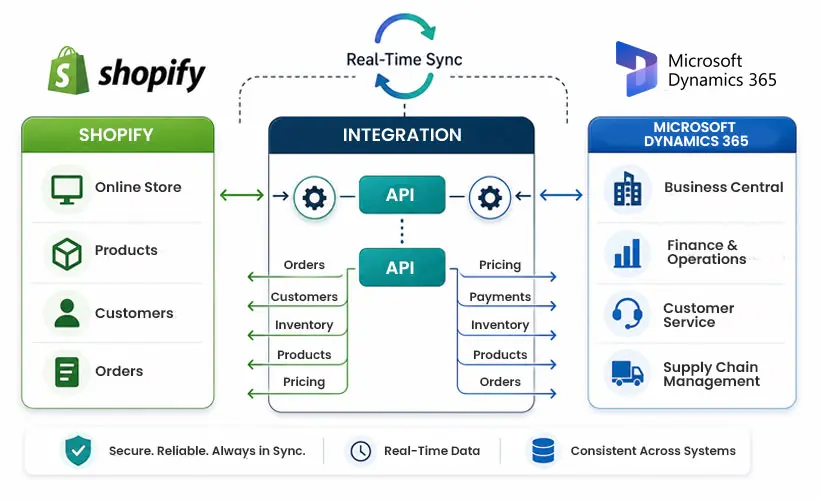
Shopify Business Central integration is the bridge between the two. It connects your Shopify storefront to Microsoft Dynamics 365 Business Central so your orders, inventory, customer records, and financials stay in sync, automatically, without anyone manually moving data from one place to another.
This guide covers how it works, what you get out of it, and how to set it up without making the mistakes most businesses make the first time.
You can learn about Shopify Business Central Integration here: Microsoft Build 2026.
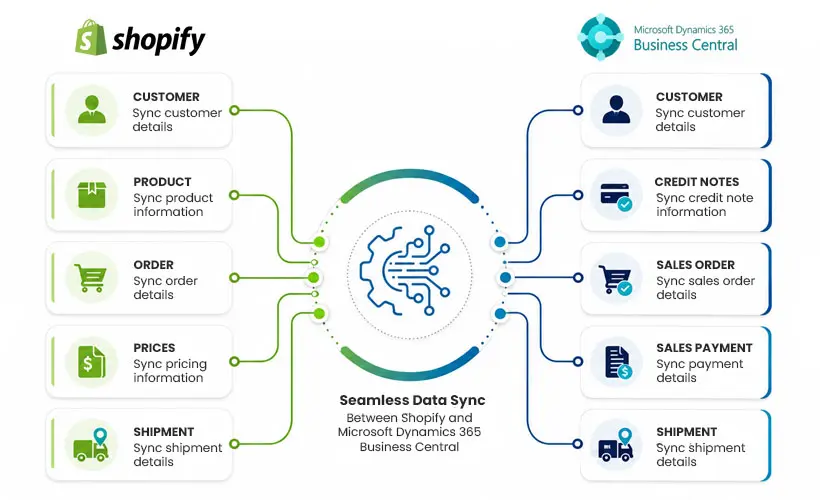
Shopify Business Central integration is a live data connection between your Shopify store and Microsoft Dynamics 365 Business Central, a cloud ERP built for small and mid-sized businesses.
When it is set up correctly, every order placed on Shopify flows into Business Central on its own. Inventory adjusts. The customer record gets created or updated. The transaction hits your general ledger. No spreadsheets. No copy-pasting. No one-day lag where your warehouse is working from yesterday’s numbers.
The short version: your store and your back office finally speak the same language.
 Source: https://enterprise.trangotech.com/microsoft-dynamics-365-shopify-integration/
Let’s be real. Nobody integrates Shopify with an ERP because it sounds exciting. They do it because something broke, or because they can see it about to break.
Here is what usually pushes people over the edge:
The manual data entry becomes unsustainable- There is only so long a team can keep re-entering Shopify orders into their accounting software before someone makes an expensive mistake, or just stops doing it consistently.
Inventory accuracy falls apart at scale- When Shopify and your warehouse system are not talking to each other, you end up selling stock you do not have. Customers get delay emails. Refunds happen. Trust takes a hit.
Finance cannot close the books cleanly- Reconciling Shopify payouts against your GL becomes a multi-day headache every month. Transactions live in different places, categorized differently, and nobody agrees on what the actual revenue number is.
Hiring more people to manage the gap is not a long-term fix- Some businesses try to solve the data problem by adding more staff. It works for a while. Then order volume goes up again and the problem comes back, just more expensive.
Multi-channel or multi-market operations need a central source of truth- If you are running more than one Shopify store, selling in multiple currencies, or expanding into new countries with different tax rules, you need a system that handles it all in one place.
Microsoft Dynamics 365 Business Central is built for exactly this- And its native Shopify connector means the integration is less of a custom project and more of a configuration task.
Microsoft added a built-in Shopify connector to Business Central back in 2022. It lives inside the platform — no third-party middleware required for most setups, though tools like Celigo or KingswaySoft are options if your workflow is more complex.
The flow looks like this when everything is running:
That whole chain runs on its own. Your team handles exceptions, not routine data movement.
| Data Type | Direction |
| Products and variants | Shopify ↔ Business Central |
| Inventory quantities | Business Central → Shopify |
| Customer records | Shopify → Business Central |
| Sales orders | Shopify → Business Central |
| Fulfillment status | Business Central → Shopify |
| Pricing and discounts | Business Central → Shopify |
| Financial transactions | Shopify → Business Central |
| Refunds and returns | Shopify → Business Central |
You can configure sync to run in real time, every few minutes, or on a scheduled batch, depending on your order volume and business needs. High-volume retailers typically use real-time or near-real-time sync to keep inventory accurate during peak hours.
Native connector, no custom code needed- Microsoft built this directly into Business Central. You connect your Shopify store, map your fields to match your item numbers and chart of accounts, and turn it on. If you run multiple Shopify stores, the connector handles that too, each store gets its own configuration within a single Business Central environment.
Multi-store support- Whether you have one storefront or five, all of them can feed into the same Business Central instance. Inventory, orders, and financials consolidate automatically.
Product and variant sync- When you update a price, edit a description, or add a new variant in Business Central, those changes push to Shopify. SKU mapping is the key thing to get right before launch, more on that in the best practices section.
Tax and payment mapping- The connector links your Shopify payment gateways to specific accounts in your General Ledger and maps tax codes correctly by region. If you have ever tried to manually reconcile Shopify payouts against tax records, you know how much time this saves.
Returns and refund handling- A return submitted through Shopify creates a return order in Business Central. If the return is approved and stock comes back in, inventory updates. A credit memo posts to the ledger. The whole thing is traceable without anyone doing manual entries.
Multi-currency support- For brands selling in more than one currency, Business Central converts transactions to your base currency as they come in. This matters a lot for month-end close and tax compliance if you operate across borders.
Get your SKU mapping right before anything else. This is the single most common reason integrations break in the first few weeks. If your Shopify product IDs do not match your Business Central item numbers, syncs will fail or create duplicate records. Audit both systems before you flip the switch.
A clothing brand with a growing Shopify store uses the integration to manage seasonal inventory across two warehouses, automatically post sales to their accounting module, and handle return credit notes without finance staff doing manual entries. They run real-time sync during peak seasons and batch sync during quieter months.
Wholesale businesses often have customers on specific payment terms with negotiated pricing. Business Central’s customer pricing groups feed directly into Shopify so each B2B buyer sees their contract price when they log in. Orders sync the same way B2C orders do, but with net-30 terms applied automatically.
Businesses with fulfillment centers in different cities or countries can assign inventory by location in Business Central. Shopify sees the total available-to-sell quantity. Orders route to the right warehouse based on rules configured in Business Central, closest location, lowest cost, fastest delivery, or whatever logic fits the business.
A brand operating in the US, UK, and Germany can run three Shopify stores, each in the local currency, all connected to one Business Central instance. Tax rules, currency conversion, and regional reporting are handled centrally. Month-end close does not require someone manually converting spreadsheets from three currencies.
Microsoft has been investing heavily in Business Central, and Copilot features are starting to show up in ways that directly affect how the Shopify integration works.
Demand forecasting is one area moving fast. Copilot in Business Central analyzes historical Shopify sales data and uses it to suggest purchase orders before you run out of stock. For seasonal businesses, this is a big deal.
Customer segmentation is another. Business Central is starting to pull Shopify purchase behavior into segments that can drive pricing and marketing decisions- automatically, without someone building reports by hand.
If your Shopify store and your back office are still running separately, the question is not whether to integrate them, it is how long you can afford to wait.
The Shopify Business Central integration removes a category of operational problems that do not go away on their own. Manual data entry, inventory discrepancies, slow reconciliation, fragmented reporting, all of it gets better when the systems are connected.
Microsoft’s native connector makes the setup more accessible than it used to be. You do not need a six-month implementation project. A straightforward single-store setup can be live in a few days if the prep work is done right.
Beyond Key is a leading Microsoft Solutions Partner serving Fortune 500 companies since past 20 years. With Microsoft experts, we ensure seamless Shopify integration for ensured growth and success. If you want to learn about how we helped our customers so far, you can check out our case studies.
For more information, get in touch with our D365 consultants.
1. How does Shopify integration with Dynamics 365 Business Central work?
Shopify integration with Dynamics 365 Business Central connects ecommerce and ERP operations by automatically syncing orders, inventory, products, pricing, and customer data. This helps businesses reduce manual work, improve accuracy, and maintain real-time visibility across systems.
2. What are the benefits of integrating Shopify with Dynamics 365 Business Central?
Integrating Shopify with Business Central improves inventory accuracy, automates order processing, reduces data duplication, and streamlines financial management. It also helps businesses deliver faster fulfillment and a better customer experience.
3. Can Shopify and Dynamics 365 Business Central sync inventory in real time?
Yes, Shopify and Dynamics 365 Business Central can support near real-time inventory synchronization. This helps businesses avoid overselling, maintain accurate stock levels, and improve inventory visibility across online sales channels.
4. Do I need a third-party connector to integrate Shopify with Dynamics 365 Business Central?
Not always. Businesses can use Microsoft’s native Shopify connector in Business Central or opt for third-party integration solutions based on customization, scalability, and workflow requirements.
5. How long does Shopify and Dynamics 365 Business Central integration take?
Implementation timelines depend on business complexity, customization needs, and data migration requirements. A standard integration can take a few weeks, while more advanced ecommerce environments may require longer deployment periods.

 Source: