Let’s be honest, most ERP and CRM implementations don’t fail because of bad software. They fail because of poor planning, underestimated complexity, and the assumption that “we’ll figure it out as we go.”
If you’re about to embark on a Dynamics 365 implementation journey, or you’re in the middle of the project and things feel shakier than expected, this guide is for you.
What Is Microsoft Dynamics 365? (And Why Implementation Planning Matters)
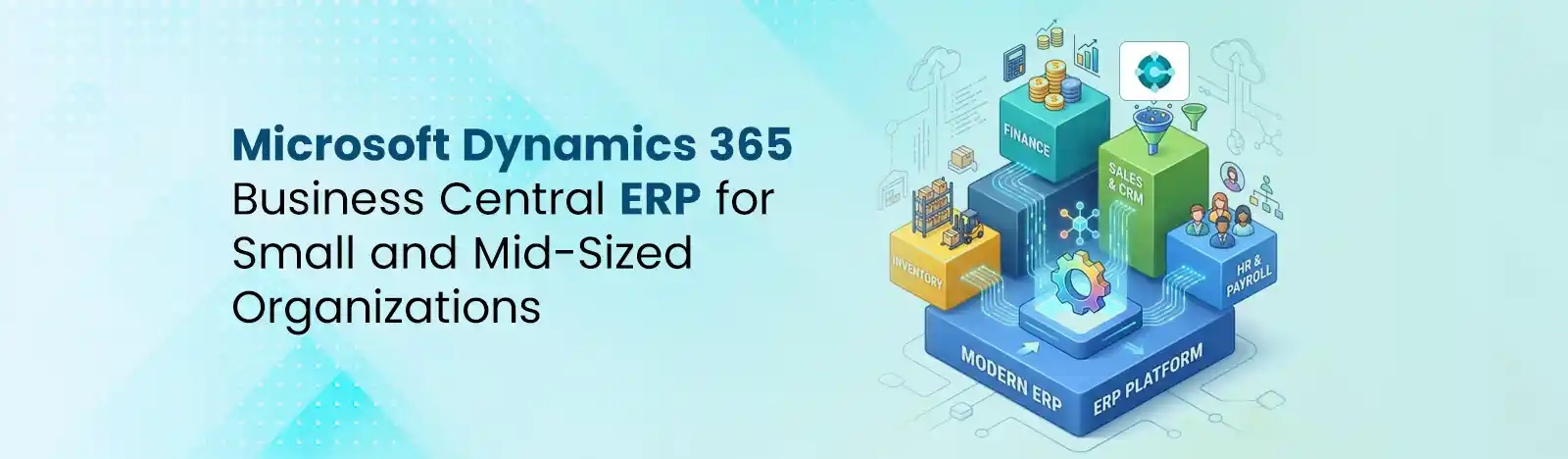
Microsoft Dynamics 365 is a cloud-based suite of business applications that integrates ERP and CRM capabilities. It runs on Microsoft Azure and integrates with MS 365, Teams, Power Platform, and Azure AI services. The core modules include Dynamics 365 Sales, Finance and Operations, Human Resources, Business Central, and more.
You can read more about Microsoft 365 F&O vs. Business Central here.
Here’s the thing most vendors won’t tell you upfront: over 55–70% of ERP implementations miss at least one major project goal, whether that’s timeline, budget, or user adoption. A Gartner study on ERP projects found that cost overruns of 50% or more are not uncommon, and Microsoft’s own partner data consistently shows that discovery and change management gaps are the top implementation stall.
The difference between a successful go-live and a six-month delay? Planning.
Before you sign any contracts, you need to answer a more fundamental question: which Dynamics 365 product is right for you?
Ask yourself these questions honestly:
If you answered yes to three or more of those, your current system isn’t a quirk; it’s a liability.
Every serious Dynamics 365 implementation follows some version of this structure. Names may change depending on your partner’s methodology — but the work doesn’t.
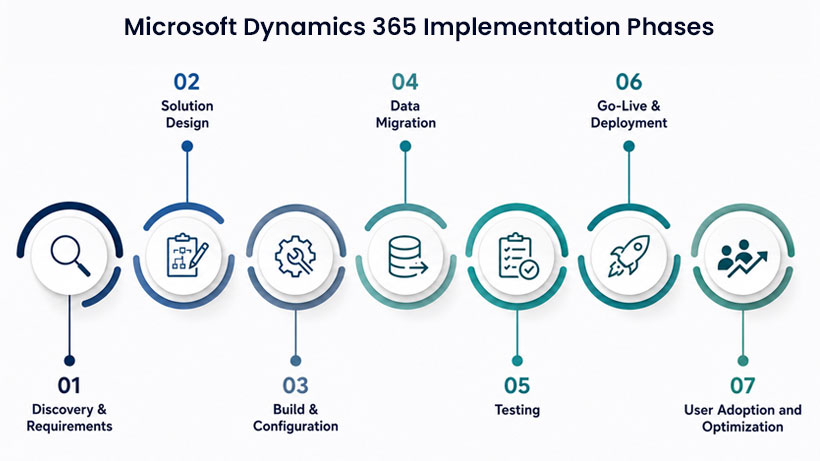 Phase 1: Discovery & Requirements
Define what you’re building before you build it.
This is where implementation success is won or lost. Stakeholder interviews, process-mapping workshops, and scope definition take place here. You’ll document current-state workflows, identify gaps, and agree on go/no-go criteria for the project.
Translate business needs into a technical blueprint.
Gap analysis tells you what D365 does natively versus what needs configuration or custom development. You’ll make the critical decision: configure out-of-the-box, or customize? (Spoiler: lean toward configuration wherever possible.) Integration mapping with existing tools – HRMS, e-commerce, third-party logistics, happens here too.
Turn the blueprint into a working system.
Development sprints (or waterfall milestones if your partner uses that approach) bring your solution to life. ISV add-ons, Power Platform extensions, and Azure integrations are built and unit tested. This phase is iterative, expect feedback loops.
Get your historical data in, clean.
This phase is consistently underestimated. A thorough data audit, deduplication, and field-mapping exercise comes before any migration scripts run. Tools like Azure Data Factory and Data Management Framework (DMF) handle the heavy lifting. Sandbox testing is non-negotiable before touching production.
Break the system before your users do.
System Integration Testing (SIT) validates that everything connects properly. User Acceptance Testing (UAT) puts real users in the driver’s seat – role-based test scripts, not generic walkthroughs. Performance and security testing close this phase out.
A solid cutover plan, a defined hypercare period (typically two to four weeks of elevated partner support), and a documented rollback strategy if things go sideways. The best go-lives are boring, that’s the goal.
Role-based training, change management communication, and KPI tracking keep the momentum going. Most organizations see 60–70% of their D365 ROI come from optimizations made in the six months after go-live, not from the implementation itself.
Timelines vary more than any vendor will admit upfront. Here’s a realistic range:
| Module | Typical Timeline | Key Variable |
| Business Central (SMB) | 8–16 weeks | Customization depth |
| Finance & Operations (Enterprise) | 6–18 months | Data complexity, integrations |
| Sales / Customer Service (CRM) | 6–12 weeks | Number of integrations |
| Full Suite (ERP + CRM + Power Platform) | 12–24 months | Org size, data readiness |
Cost is the conversation people delay until it’s awkward. Have it early. The main components:
Partner selection matters as much as product selection, sometimes more. Microsoft’s partner ecosystem is enormous, and quality genuinely varies.
Since 2022, Microsoft recognizes Solutions Partners for Business Applications, the designation that replaced the older Gold and Silver tiers. Earning it requires demonstrated capability, customer success references, and ongoing skilling commitments, so it’s a meaningful baseline filter, though not a guarantee on its own.
The questions, every decisionmaker should ask their ERP solution provider.
Artificial intelligence is no longer a roadmap item for the future in Dynamics 365; it’s embedded in the product today. And if you’re starting an implementation now, you need to plan for it from day one.
Current Copilot capabilities embedded across D365 modules include:
If you plan to activate Copilot features during implementation, your project needs to account for:
The plan for 2026 release wave 1 covers new features for Dynamics 365 releasing from April 2026 through September 2026. Microsoft releases major product updates twice a year: Wave 1 (April) and Wave 2 (October). If your go-live falls in Q1 or Q3, verify whether any changes to the incoming release wave affect any configured functionality. Good partners factor this into the project timeline.
Dynamics 365 implementation isn’t an IT project. It’s a business transformation program. The organizations that get the most from it, faster financial closes, real-time visibility, connected customer journeys, are the ones that invest in planning, choose the right partner, and treat adoption as seriously as configuration.
Our team delivers end-to-end Dynamics work: consulting, implementation, migration, Copilot enablement, and ongoing support, backed by follow-the-sun coverage across US and APAC time zones. We’ll start by understanding your processes, not by selling you modules. Ready to scope your move? Request your ERP/CRM readiness assessment, and we’ll map your current state against the seven phases above before anyone talks pricing. Get in touch with us.
Trusted by leaders: Prodigy Care Services, CGIAR System Organization, and more.
1. What is Microsoft Dynamics 365 implementation?
Microsoft Dynamics 365 implementation is the process of deploying, configuring, migrating data, testing, and launching Dynamics 365 applications for business operations.
2. How long does a Dynamics 365 implementation take?
A Dynamics 365 implementation can take anywhere from 6 weeks to 24 months, depending on business size, customization requirements, and data complexity.
3. What are the phases of a Dynamics 365 implementation?
The main phases are discovery, solution design, build and configuration, data migration, testing, go-live, and post-launch optimization.
4. Why do Dynamics 365 implementation projects fail?
Common reasons include poor planning, unclear requirements, inadequate testing, weak change management, and poor data quality.
5. Can Dynamics 365 integrate with Microsoft 365 and Teams?
Yes. Dynamics 365 integrates with Microsoft 365, Teams, Power Platform, Azure services, and many third-party applications.
6. What is Dynamics 365 Copilot?
Dynamics 365 Copilot is Microsoft’s AI assistant that helps automate tasks, generate insights, summarize information, and improve productivity.