Running a retail business comes with its own set of challenges. From overnight inventory shifts to meeting customer expectations and managing sales channels, you must handle a range of responsibilities. That’s where the role of ERP comes. ERP for retail is an integrated business management suite that manages core retail operations. From supply chain, procurement, Point of Sale, to CRM etc., it handles operations and improves efficiency.
Microsoft Dynamics 365 Business Central is a good choice to invest in if you run a retail business. It comes multiple business capabilities for managing day-to-day retail operations. This makes it easier to manage work and improve efficiency without overcomplicating things. In this blog, you will read about retail ERP, how it works, and why you should invest in the Business Central solution.
ERP for retail is a centralized software suite that integrates and streamlines core retail business functions. From inventory, sales, finance, and CRM, businesses can get insights about all departments on one platform. Instead of managing 5 tools, ERP lets you create a single source of truth across all operations.
Considering online shopping trends, retailers have to manage shopping across both web portals and physical retail shops. They need to focus on which products are selling well, what makes customers happy, and how to retain customers. Technology and shopping trends are constantly changing, making it difficult for retailers to survive. If you are a retailer who’s struggling to manage everything on standalone tools, ERP is the savior.
Retail businesses leverage this software:
According to Gartner, ERP systems have become foundational infrastructure for mid-market retailers aiming to eliminate data silos and improve operational efficiency.
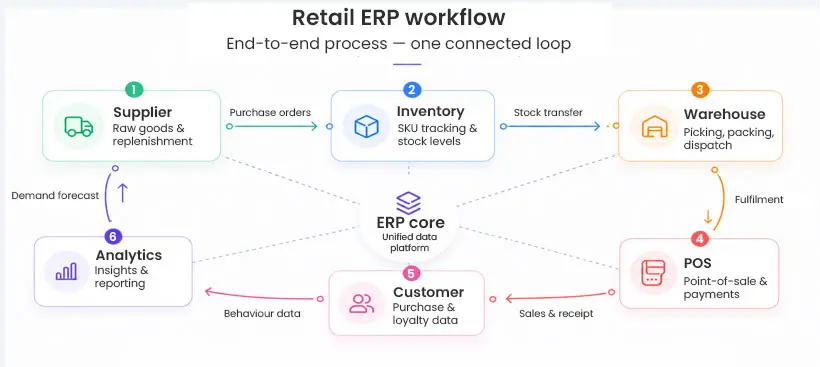 How Does ERP Help a Retail Business?
ERP helps retail businesses create a single source of truth by unifying departmental data, automating operations, and reducing errors. Here is the explanation of how ERP helps retail businesses:
Real-Time Inventory Visibility
Inventory management is one of the core areas retailers must manage. ERP aligns inventory-related information/files and reports to all locations where inventory is stored. If anyone purchases the unit of inventory, the system updates the stock levels.
Streamlined Purchasing and Vendor Management
To avoid understocking, the ERP system ensures that the predefined reorder point is generated automatically, gets approved, and is shared with the vendor. This eliminates the manual task of order tracking. It also allows decision makers to focus on planning and strategizing.
Omnichannel Sales Management
An enterprise resource planning software unifies sales data from all these sales channels, This gives you a complete picture of demand to help you fulfill orders on time. Whether your customers place orders on the mobile app, website, or marketplace, ERP manages and unifies data from all sources to avoid confusion.
Financial Accuracy and Compliance
ERP eliminates manual data entry between your POS, accounting software, and spreadsheets. Every transaction posts automatically to the general ledger, making month-end close faster and audits easier. This is especially important for U.S. retailers dealing with state sales tax compliance across multiple locations.
Better Customer Experience
When your team has access to accurate inventory, order history, and customer data in one system, they can answer questions quickly, fulfill orders faster, and handle returns without friction.
In the recent Microsoft Dynamics 365 Future of Enterprise Resource Planning (ERP) Survey, Microsoft discovered that 93% of business leaders recognize the benefits of adopting flexible and integrated ERP systems.
Source: Microsoft
Built on Microsoft Azure, Business Central ensures enterprise-grade security, uptime, and scalability—so retailers can grow without worrying about system limitations. Microsoft Dynamics 365 Business Central is a cloud-based ERP designed for small to mid-sized businesses. It was built on the Microsoft Navision (NAV) platform. This platform has served retail and distribution businesses for decades. It has been modernized for today’s cloud-first environment. Let us see how it helps retailers manage their business.
Deep Integration with the Microsoft Ecosystem
Most retail businesses already use Microsoft 365: Outlook, Excel, Teams, and SharePoint. Business Central integrates natively with all of them. Microsoft 365 Business Central lets users extract live inventory information into Excel. Teams can process purchase orders from Outlook. They can share financial reports on Teams to make communication hassle-free.
Built-In Inventory and Warehouse Management
Business Central includes comprehensive inventory management capabilities such as:
Data Security and Compliance Considerations
Built on Microsoft Azure, Business Central adheres to global compliance standards such as:
Flexible Pricing and Promotions
Retail pricing is complex. You may have base prices, customer-tier pricing, seasonal markdowns, and promotional discounts all running simultaneously. Business Central supports multi-level pricing structures, trade discounts, and campaign-based pricing, all configurable without custom development.
Financial Management Built for Multi-Location Retail
Managing finances across multiple stores or business entities can quickly get complicated but the system simplifies it. You can manage accounts in one software for multiple locations while managing transactions between subsidiaries.
It also lets you use flexible tagging (called dimensions) to break down your data by department, store, or sales channel, so your reports are much more detailed and meaningful. On top of that, routine tasks like bank reconciliation and cash flow tracking have become easier to manage.
Scalable, Cloud-Based Architecture
Business Central grows as your business scales. For example, if you open new store locations and expand to new markets, or your customer base grows, server capacity in BC also increases. As Business Central runs on Azure Cloud, it ensures automating AI agents automate payables, monitoring sales order and flag issues in real-time. It also offers integration with Microsoft stack and thousands of AppSource addons.
Extensive Retail-Specific Extensions
Microsoft AppSource allows retailers to expand Business Central capabilities with certified add-ons for:
There’s a apparel retailer with ten locations across Mideast, an evolving web-based or e-commerce channel and multiple warehouses for distribution. Before investing in ERP solution, they managed accounting operations in QuickBooks and inventory on Excel sheets. For website traffic and sales, they had a standalone tool. With frequent stockouts, they could not deliver orders on time. But as they got Business Central deployed, these were the benefits they cherished:
Retailers who get the most from Business Central typically follow a few key principles:
1. Make sure that your data is clean and structured
ERP software is more efficient when the data you feed is structured. Make sure to evaluate your historical sales data, vendor records, and item master are audited. Poor data quality creates trouble in ERP implementations. Make sure to remove duplicate SKUs and validate data.
2. Invest in user training
From POS employees to warehouse staff, everyone should be given comprehensive hands-on ERP training to ensure minimal errors while using the software. Retail staff should understand how to leverage all ERP capabilities.
3. Ensure Omnichannel Integration
ERP software connects with e-commerce platforms, POS systems, CRM tools, inventory and warehouse management platforms. Users should use this functionality to fill reporting gaps with end-to-end integration.
4. Plan for Phased Rollout
Many retail ERP implementations fail because companies try to go live across the board at once. A phased approach, starting with financials and inventory, then adding advanced warehouse and e-commerce integrations reduces risk and allows your team to build confidence gradually.
Enterprise Resource Planning software is a critical business management solution that integrates sales, purchase, finance, and other departments. It brings data from all teams into a single centralized platform and helps management make better, faster, and smarter decisions. In the retail sector, as competition rises, investing in an ERP system can provide retailers with a high level of visibility and control. This is essential to stay competitive and succeed in the business world.
If you’re evaluating ERP solutions, the next step is to assess your current processes, identify gaps, and consult with a strategic Microsoft partner. Beyond Key’s Dynamics 365 consulting team understands retail workflows. The right approach can turn ERP from a software investment into a long-term business advantage. Connect with us to understand how ERP can help you evolve.
Beyond Key is a global technology solution provider, headquartered in Chicago. With a team of Microsoft-certified professionals, we strive to understand our clients’ needs and deliver best-in-class solutions. Our Microsoft Cloud Technology Soup include Power BI, Microsoft PowerApps, Microsoft Azure, Dynamics 365, SQL Server, SharePoint and more. Connect with us to learn more about our offerings.
Trusted by Industry Leaders: Prodigy Care Services, CGIAR System Organization, and more.
1. What is ERP in retail?
ERP in retail is a centralized software system that integrates inventory, sales, finance, and supply chain operations into a single platform. It helps retailers streamline processes and improve decision-making.
2. Why do retail businesses need ERP software?
Retail businesses need ERP software to manage multi-channel sales, track inventory in real time, automate purchasing, and gain better visibility into financial performance.
3. Is Microsoft Dynamics 365 Business Central good for retail?
Yes, Microsoft Dynamics 365 Business Central is a strong fit for retail businesses because it offers built-in inventory management, financial tracking, and seamless integration with Microsoft tools like Excel and Teams.
4. How does ERP improve inventory management in retail?
ERP systems provide real-time inventory tracking across stores, warehouses, and e-commerce platforms. This reduces stockouts, prevents overstocking, and improves order fulfillment.
5. Can ERP handle omnichannel retail operations?
Yes, ERP systems unify data from physical stores, online platforms, and marketplaces, allowing retailers to manage all sales channels from one system.
6. What are the benefits of Business Central for multi-store retail?
Business Central helps multi-store retailers:
7. How long does ERP implementation take for retail businesses?
A small retailer can go live in 3 to 6 months, depending on data complexity, business size, and integration requirements. On the other hand, large-scale organizations might take 9-12 months.