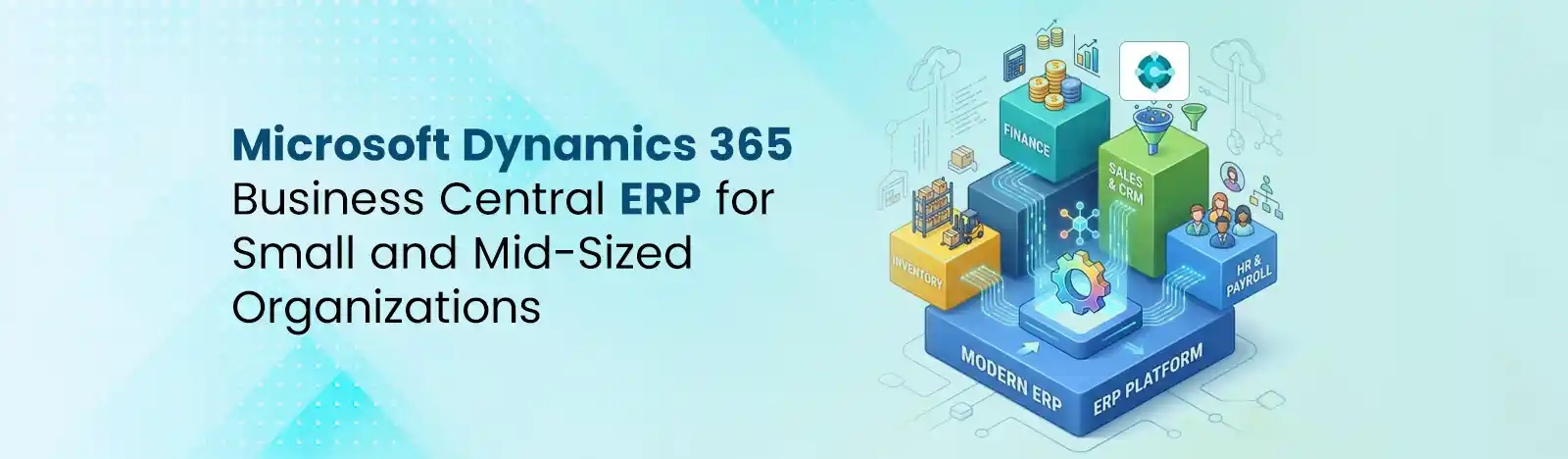
Microsoft Dynamics 365 is an AI-powered enterprise platform that brings end-to-end CRM and ERP capabilities together. It helps organizations streamline their sales, services, supply chain, marketing, and finance operations. Per your business requirements, you can select modules and categorize them into domains. So, you don’t have to pay for a one-size-fits-all solution.
Quick answer: Microsoft Dynamics 365 overview in one line: it’s Microsoft’s modular, cloud-first suite of CRM and ERP applications, built on the Power Platform and Dataverse, used by businesses to run sales, service, finance, and supply chain operations from connected data.
Microsoft Dynamics 365 is named a Leader in three Gartner® Magic Quadrant™ reports: Cloud ERP for Service-Centric Enterprises, Cloud ERP for Product-Centric Enterprises, and Cloud ERP Finance Source: Gartner
This is one of the most common points of confusion for anyone new to the platform, and the honest answer is that Dynamics 365 isn’t strictly one or the other; it’s both, divided into separate applications.
CRM applications in the Dynamics 365 suite focus on customer-facing work: tracking leads, managing service cases, scheduling technicians, and running marketing campaigns. ERP applications focus on the back office: financial reporting, inventory, procurement, manufacturing, and payroll-adjacent HR processes. A company might run only the CRM side, only on the ERP side, or both together, depending on what problems it’s trying to solve.
A company might run only the CRM side, only the ERP side, or both together, depending on what problems it’s trying to solve.
| Aspect | Dynamics 365 CRM Apps | Dynamics 365 ERP Apps |
| Core focus | Customer relationships — sales, service, marketing | Business operations — finance, supply chain, HR |
| Example apps | Sales, Customer Service, Field Service, Customer Insights | Finance, Supply Chain Management, Business Central, Human Resources |
| Typical buyer | Sales, service, and marketing leaders | CFOs, operations directors, controllers |
| Primary data tracked | Contacts, leads, opportunities, cases, work orders | Ledgers, inventory, purchase orders, employee records |
| Underlying platform | Dataverse | Dataverse (Business Central and F&O apps have their own data models that connect to Dataverse) |
For a deeper breakdown of how each individual application fits into a broader rollout, see our Dynamics 365 implementation guide or our overview of Dynamics 365 Customer Engagement (CE).
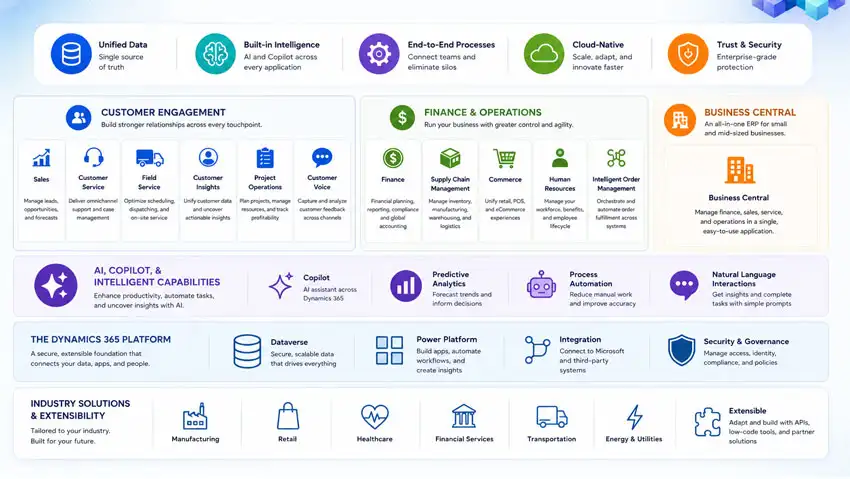
The CRM side of Dynamics 365 is what most mid-sized businesses evaluate first, largely because it competes directly with Salesforce and HubSpot. Each app below can be licensed on its own or bundled together.
Dynamics 365 Sales
Dynamics 365 Sales is the pipeline and opportunity management application. It gives sales teams a structured view of leads, deals, forecasts, and relationships, with AI-assisted features that flag at-risk deals and suggest next steps based on email and meeting activity. Sales Enterprise adds forecasting, playbooks, and deeper customization compared to the entry-level Sales Professional tier. Teams already using Outlook and Teams tend to adopt it faster because activities sync directly into the CRM record without extra data entry.
Dynamics 365 Customer Service
Dynamics 365 Customer Service is the case-management and support application. It routes tickets, tracks SLAs, and gives agents a unified view of a customer’s history across channels, chat, email, phone, and self-service portals. Copilot-assisted case summarization and suggested responses have become a bigger differentiator in recent releases, cutting down average handle time for agents working high case volumes.
Dynamics 365 Field Service
Dynamics 365 Field Service manages on-site technicians: scheduling, dispatching, work orders, and inventory tracking for parts used in the field. It’s built for industries like HVAC, utilities, and equipment maintenance, where a technician’s calendar, van stock, and customer contract terms all need to line up before a truck rolls. Resource scheduling optimization can auto-assign jobs based on technician skill, location, and availability rather than manual dispatch boards.
Dynamics 365 Customer Insights (Marketing)
Dynamics 365 Customer Insights combines what used to be two separate products; Customer Insights (data) and Dynamics 365 Marketing into a single customer data and journey-orchestration app. It unifies customer profiles from multiple sources, builds segments, and triggers real-time marketing journeys across email, SMS, and other channels. For businesses trying to personalize outreach without stitching together a separate CDP, this is the module that closes that gap.
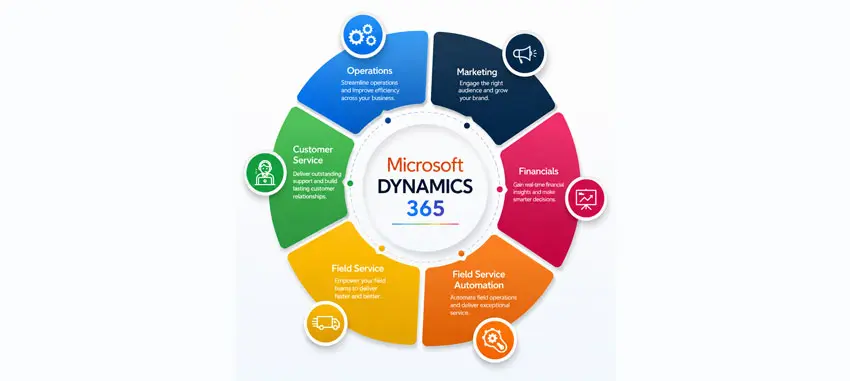
The ERP side runs the parts of a business that customers never see directly, but that keep the business solvent. These modules are more complex to implement than the CRM apps and usually involve a longer rollout timeline.
Finance
Dynamics 365 Finance handles general ledger, accounts payable and receivable, budgeting, and financial reporting for mid-sized to large organizations, with built-in compliance and multi-entity, multi-currency support.
Check out this: Microsoft Dynamics 365 Finance & Operations vs Business Central
Supply Chain Management
Dynamics 365 Supply Chain Management covers inventory, procurement, manufacturing, and warehouse operations, with planning tools designed to help businesses respond to demand shifts and supplier disruptions.
Business Central (SMB-tier ERP)
Business Central is the ERP application built specifically for small and mid-sized businesses that need core financial and operational management without the complexity or cost of the full Finance and Supply Chain Management apps.
Human Resources
Dynamics 365 Human Resources manages employee records, benefits administration, leave and absence tracking, and compensation planning, integrating with payroll systems rather than replacing them outright.
What separates Dynamics 365 from a pile of unrelated software is the platform underneath it. Every core app- Sales, Customer Service, Field Service, Customer Insights, and most of the ERP suite reads and writes to Dataverse, Microsoft’s shared business data platform. That means a service opened in Customer Service can reference the same customer record used in Sales, without a nightly sync job or a third-party integration tool holding it together.
On top of Dataverse sits the Power Platform: Power BI for reporting, Power Automate for workflow automation, Power Apps for custom interfaces, and Copilot Studio for building AI agents. A Dynamics 365 application isn’t really a closed box, it’s a starting point that most businesses eventually extend with a Power Automate flow or a Power BI dashboard pulling straight from the same data. This is also where pairing Dynamics 365 with Power BI reporting tends to pay off, since finance and sales leaders get a single source of truth rather than exporting spreadsheets from separate systems.
The Dynamics 365 release plan for 2026 release wave 1 announces the latest updates to customers as features are prepared for release.
Source: Microsoft
Dynamics 365 pricing is per-user, per-month, and it varies significantly by application. As a general guide for 2026:
| License Type | Approximate Monthly Range (per user) |
| Team Members (limited access, cross-app) | ~$8 |
| Business Central Essentials | ~$70–$80 |
| Business Central Premium | ~$100–$110 |
| Sales / Customer Service Enterprise | ~$95–$105 |
| Field Service | ~$95–$105 |
| Finance / Supply Chain Management | ~$180–$210 |
| Attach licenses (additional apps for an existing user) | ~$20–$30 |
Two things matter more than the sticker price. First, Microsoft’s “attach” pricing model rewards multi-app adoption; once a user has a full-price base license, additional qualifying apps are typically far cheaper, which is why bundling Sales with Customer Service, for instance, often costs less per app than buying either alone. Second, the license fee is only one line item. Implementation, data migration, integrations, and training commonly cost several times the annual license total, particularly for ERP rollouts.
Not sure which Dynamics module fits your business needs?
Talk to our Dynamics 365 ConsultantThis comparison comes up in nearly every CRM evaluation, and there isn’t a universal winner; the right platform depends on what a company already uses and how complex its processes need to be.
| Dynamics 365 | Salesforce | |
| Best fit | Microsoft-centric organizations already using Microsoft 365, Teams, Azure | Organizations prioritizing deep CRM-specific customization and a large app marketplace |
| ERP integration | Native ERP apps (Finance, SCM, Business Central) on the same platform | CRM-only; ERP requires third-party or bolt-on solutions |
| Pricing model | Modular, per-app, with attach discounts for multi-app customers | Tiered per-user pricing, generally higher for comparable enterprise tiers |
| Customization approach | Power Platform (low-code, native) | Apex, Lightning, extensive partner ecosystem |
| Learning curve | Lower for teams already in Outlook/Teams | Steeper, but very mature admin tooling |
Dynamics 365 is used across a wide range of industries, but a few patterns show up consistently:
Most businesses over-scope their first Dynamics 365 purchase. A more reliable approach is to work backward from the specific problem being solved:
Copilot in Dynamics 365 apps helps users connect data with Teams and MS Outlook. As it offers no-code tools, even people with non-tech background can automate workflows, build apps and enhance productivity. D365 platforms are backed by built-in AI, advanced analytics, and the Internet of Things, which ensures your organization is agile and future-ready. Using Copilot Studio, you can create custom agents and make faster decisions for every department.
Related Reading:
Microsoft Dynamics 365 isn’t one product, it’s a modular suite of CRM and ERP applications built on a shared data platform, which is exactly what makes it flexible enough for a 40-person business and a multinational enterprise alike.
The apps that matter most depend entirely on where the operational pain actually is: sales visibility, service response time, field logistics, or financial reporting. Pricing and licensing are the parts most businesses get wrong, so it’s worth confirming current rates and attaching eligibility before committing to a rollout.
Beyond Key has been helping global customers with implementing, integrating, and customizing the Microsoft Dynamics 365 platform with minimal disruption. We have been doing this since 2 decades.
We developed custom-built CRM tailored to specific mission-driven interests of CGIAR. Using the CRM the non-profit was able to execute better levels of service, reduce internal costs, make smarter decisions, and increase the level of resources going directly to beneficiaries. You can download the case study here.