Microsoft Dynamics 365 Finance and Sales Integration: A Complete Technical Guide
How to integrate Microsoft Dynamics 365 Finance with Dynamics 365 Sales, covering Dual-Write, Virtual Entities, Data Integrator, and Azure-native patterns for a unified quote-to-cash experience.
Introduction
Microsoft Dynamics 365 Finance and Dynamics 365 Sales are two of the most widely deployed applications in the Microsoft business application stack, but many organizations treat them as separate systems long after they should have been connected. The result is predictable: sales teams quoting from stale pricing, finance teams reconciling orders that were never properly captured, and leadership making decisions from dashboards that reflect two different versions of the truth.
According to Gartner’s ERP Market Insights report (2024), more than 70% of ERP installations fail to reach their original business goals, a statistic that underscores how much architectural decision-making and integration design matter at the outset of a deployment.
Integrating Microsoft Dynamics 365 Finance with Dynamics 365 Sales creating a unified quote-to-cash data flow across your ERP and CRM is not a plug-and-play configuration task. It requires deliberate architectural decisions about which integration pattern to use, which data entities to synchronize, how to handle conflict resolution when both systems write to the same record, and how to govern the integrated environment long-term.
This guide covers the technical architecture, integration patterns, data entity mapping, and implementation considerations for organizations planning to integrate Microsoft Dynamics 365 ERP with Dynamics 365 Sales, written from a practitioner’s perspective based on more than 60 completed integration projects.
Who this guide is for
IT architects, Dynamics 365 administrators, and business technology leads at organizations using or evaluating D365 Finance and D365 Sales who are planning an integration project. Estimated reading time: 10 minutes.
Why Integrating D365 Finance with D365 Sales Matters: The Business Case
Before addressing architecture, it is worth stating why integration is necessary at all. Dynamics 365 Finance (the ERP) and Dynamics 365 Sales (the CRM) serve different user communities, finance and operations vs. sales and marketing, but they share a large set of overlapping data: customers, products, pricing, orders, and payment status.
When that shared data lives in two disconnected systems, the symptoms are consistent across every industry we have worked in:
- Sales reps quote prices that no longer match the current Finance price list, leading to margin erosion and rework.
- Closed-won opportunities in Sales generate manual data entry into Finance, a duplication of effort that introduces errors and delays order processing.
- Finance has no visibility into the sales pipeline, making cash flow forecasting a guesswork exercise rather than a data-driven one.
- Customer credit limits enforced in Finance are invisible to the sales team, who continue pursuing and closing orders for accounts that are on hold.
- Month-end reconciliation between CRM opportunity data and Finance revenue requires hours of manual matching, a process that should not exist.
In a 2023 Total Economic Impact study commissioned by Microsoft, Forrester Research found that organizations combining D365 ERP and CRM data achieved a 106% return on investment and more than $8 million in net present value over three years.
A properly architected Microsoft Dynamics 365 Finance and Sales integration eliminate all five of these failure modes. It creates a single customer record, a single price book, a single order lifecycle, and a single view of receivables, visible to the right people in whichever application they work in daily.
What Data Needs to Flow Between D365 Finance and D365 Sales
The first architectural decision in any D365 Finance–Sales integration is entity scoping: determining exactly which data objects need to be synchronized, in which direction, and at what frequency. Attempting to sync all data creates two problems: unnecessary complexity and performance degradation.
The table below maps the standard data entities, their source and target, and the direction of synchronization in production-grade integration.
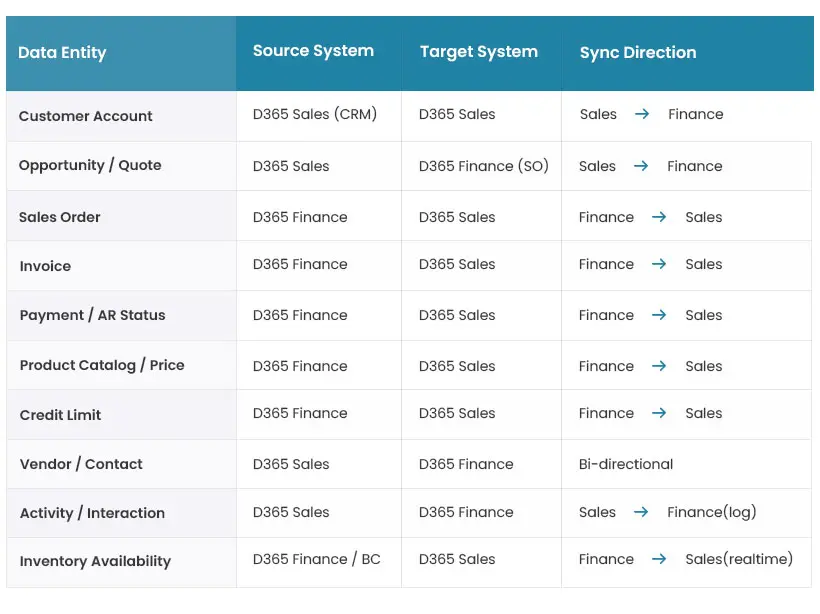
Two scoping principles deserve emphasis. First, direction matters as much as scope. Product catalogue and pricing should always originate in Finance and flow to Sales, not the reverse allowing Sales to overwrite Finance pricing is a governance failure with direct margin impact. Second, not all entities require real-time sync. Inventory availability queries benefit from real-time API calls; customer master synchronization can tolerate a near-real-time Dual-Write cadence; historical invoice data can be batch-synced nightly.
Integration Patterns: Choosing the Right Architecture
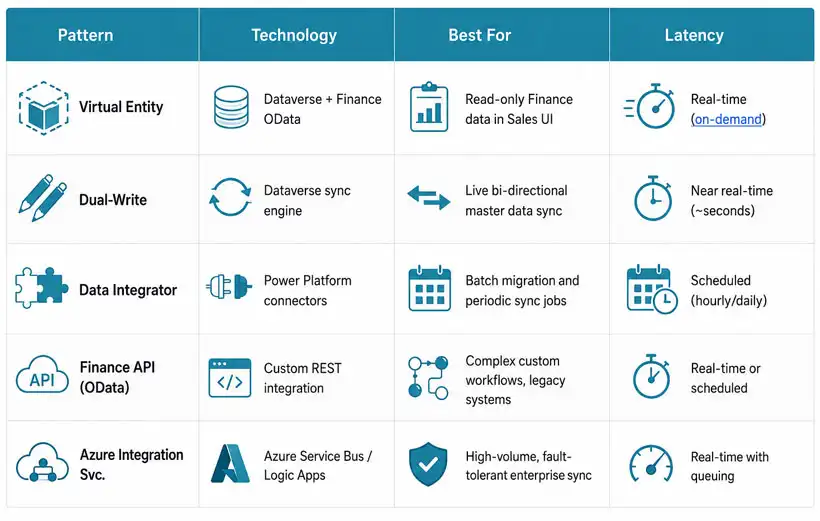
Microsoft provides multiple native integration mechanisms for connecting Dynamics 365 Finance with Dynamics 365 Sales. Each pattern has distinct latency characteristics, maintenance requirements, and appropriate use cases. Choosing the wrong pattern for a given data entity is a frequent source of integration failure.
Dual-Write: The Preferred Pattern for Master Data
Dual-Write is Microsoft’s native, bidirectional synchronization framework between Dataverse (the platform underlying D365 Sales) and D365 Finance & Operations apps. When enabled, changes to mapped entities in either application are propagated to the other in near-real time — typically within seconds without custom code or middleware.
Dual-Write is the recommended pattern for master data synchronization: customers, contacts, products, price lists, and units of measure. It uses Dataverse’s change-tracking mechanism and Finance’s OData feed to detect mutations and apply them to the target system. Conflict resolution is governed by a configurable priority rule; Finance records typically win for financial master data; Sales wins for contact and activity data.
Technical configuration note
Dual-Write entity maps are configured in the Finance environment under Data Management > Dual-write. Each entity map requires a unique key mapping between the Finance data entity and the Dataverse table. For the Customer entity, the standard mapping links Finance’s CustCustomerV3Entity to Dataverse’s account table using the account number field as the integration key. Before activation, run the Initial Sync in ‘read-only’ mode to surface unmapped records — Finance logs these as InfoLog warnings that can be exported and reviewed before committing.
Critical implementation consideration: Dual-Write requires clean, consistent data in both systems before activation. Running the initial sync against mismatched or duplicate records causes mapping failures that are difficult to diagnose after the fact. Beyond Key always performs a data quality assessment and deduplication pass before enabling Dual-Write in production.
Virtual Entities: Finance Data in the Sales UI Without Sync
Virtual Entities enable D365 Sales users to access D365 Finance data through the Dataverse API invoices, payment history, AR balances, and credit limits without storing that data in Dataverse. The Sales interface receives real-time Finance data through a query that runs against Finance’s OData endpoint.
This pattern is ideal for read-only Finance data that sales reps need for context before creating a quote: current outstanding balance, inventory stock levels, payment terms. Virtual Entities add zero storage overhead to Dataverse and require no ETL pipeline, but they introduce a Finance API dependency that must be accounted for latency and resilience planning.
Finance OData API: Custom Integration Scenarios
For complex workflows that neither Dual-Write nor Virtual Entities handle natively custom approval chains, multi-system integration buses, legacy system connections, D365 Finance exposes a comprehensive OData REST API. Every data entity in Finance has a corresponding OData endpoint, and custom business events can trigger outbound calls to Logic Apps, Azure Functions, or external endpoints.
When integrating Microsoft Dynamics 365 ERP with Dynamics 365 Sales alongside other enterprise systems (Salesforce, SAP, legacy ERPs, custom databases), Beyond Key typically implements an Azure Integration Services layer, Azure Service Bus for message queuing, Logic Apps for orchestration, and API Management for endpoint governance to provide fault tolerance, retry logic, and centralized monitoring across all integration touchpoints.
|
“The most expensive integration mistake we see is organizations choosing a pattern based on what is easiest to configure rather than what the data entity actually needs. Putting transactional order data through Dual-Write creates conflict resolution nightmares. Using batch sync for credit limit checks creates compliance failures. Pattern selection must follow the data, not the path of least resistance.”
— Milin Dholakia, COO, Beyond Key |
Quote-to-Cash: The End-to-End Integrated Workflow
The business outcome of a well-architected D365 Finance and Sales integration is a seamless quote-to-cash workflow — where a sales opportunity in D365 Sales flows automatically through quoting, order creation, fulfilment, invoicing, and payment collection in D365 Finance, with the relevant status visible to the right stakeholders in their native application at every stage.
A production-grade integrated workflow moves through seven stages:
- Opportunity Creation: Sales rep creates an opportunity in D365 Sales. Account data, credit limit, outstanding balance, and payment terms are visible via Virtual Entity without leaving Sales.
- Quote Generation: Quote is generated in D365 Sales using product and pricing data synchronized from Finance via Dual-Write. Pricing accuracy is guaranteed no manual price list maintenance in CRM.
- Order Capture: Opportunity is marked Closed Won in Sales. A business event triggers automated sales order creation in D365 Finance via OData API zero manual re-entry.
- Fulfilment & Shipping: Finance processes fulfilment, inventory reservation, warehouse pick/pack/ship. Shipment status is synchronized back to the Sales opportunity record in real time.
- Invoice Generation: Finance generates and posts the invoice. Invoice reference and amount synchronize to the Sales account timeline via Dual-Write. Sales rep sees invoice status without accessing Finance.
- Payment & AR Update: Payment is received and posted in Finance. AR status updates in Sales via Virtual Entity account managers see outstanding balance cleared without a separate AR report.
- Unified Reporting: Finance Power BI reports pull consolidated revenue data by sales rep, territory, and product bridging CRM pipeline data with Finance actuals in a single reporting layer.
Want to explore how the right Dynamics 365 modules and integrations can transform your organization’s workflows?
Explore ModulesCommon Integration Failure Points and How to Avoid Them
Beyond Key has delivered Dynamics 365 Finance and Sales integration projects across manufacturing, distribution, and professional services. The following failure patterns appear repeatedly across industries and organization sizes.
- Dual-Write Activated Against Unclean Master Data
Activating Dual-Write without first reconciling customer, product, and account records between Finance and Sales is the single most common cause of integration of project failures. Duplicate customer records in one system to create ambiguous mapping targets in the other; conflicting account numbers cause sync errors that block entire entity tables. Pre-integration of data cleansing is not optional; it is the prerequisite.
- Bidirectional Pricing Without Governance Rules
Allowing D365 Sales to write price overrides back to D365 Finance without an approval workflow creates a governance gap with direct P&L impact. Pricing should always be mastered in Finance and flow to Sales as read-only. Sales reps who need pricing flexibility should trigger a discount approval workflow in Finance, not edit price list records in Dataverse.
- Missing Error Monitoring and Retry Logic
Integration failures are inevitable in any enterprise environment, network timeouts, Finance maintenance windows, Dataverse API throttling. Systems that lack a dead-letter queue, retry policy, and alerting mechanism silently lose transactions. Beyond Key implements Azure Service Bus with configurable retry policies and Power Automate monitoring flows for every integration that handles transactional data.
- Scope Creep Beyond the Initial Data Model
Integration scope has a natural tendency to expand after go-live, teams discover data they want synchronized that was not in the original design. Each addition to the Dual-Write entity map carries conflict resolution, testing, and governance implications. Beyond Key establishes a formal change control process for integration of scope changes, equivalent to the process used for ERP configuration changes.
Best practice
Run a 30-day parallel monitoring period after go-live with active comparison between D365 Finance and D365 Sales data for all integrated entities. Discrepancies identified in this window are orders of magnitude cheaper to resolve than those discovered at quarter-end audit. Beyond Key provides a pre-built Power BI monitoring dashboard covering sync latency, error rates, and entity record counts — available to all integration engagement clients.
Copilot and AI Across the Integrated D365 Environment
The integration of D365 Finance and Sales creates a data foundation that Microsoft Copilot can operate across generating insights, automating workflows, and surfacing anomalies that neither system could identify in isolation. Gartner projects that by 2027, 62% of ERP application spending will include embedded AI features, making a unified, AI-ready data foundation a competitive requirement, not merely an enhancement (Gartner ERP AI Hype Cycle, 2024).
- Cross-system AR visibility: Sales reps can ask Copilot in D365 Sales ‘What is the outstanding AR balance for this account?’ and receive a live answer pulled via Virtual Entity from Finance-No Finance access required.
- Revenue variance detection: Copilot in Finance can analyze closed-won opportunity data from Sales alongside Finance revenue actuals to surface discrepancies between pipeline forecasts and booked revenue.
- Automated workflow orchestration: Power Automate flows triggered by D365 Sales opportunity stage changes can invoke Finance business events creating draft sales orders, triggering credit checks, and notifying operations without human intervention.
- Unified executive reporting: The unified Dataverse data model enables a single Power BI report to show sales pipeline by rep alongside Finance AR ageing by account a combined view that requires no manual data join.
Implementation Roadmap: How Beyond Key Delivers D365 Finance–Sales Integration
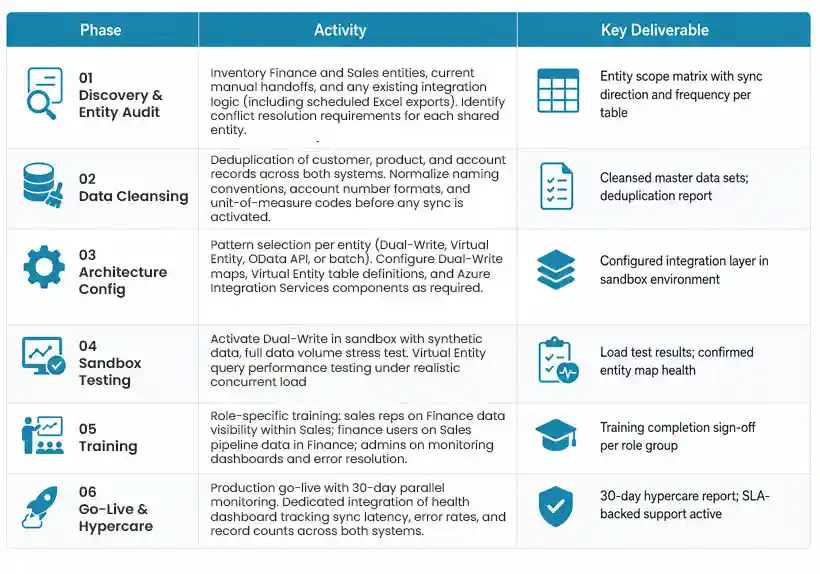
Beyond Key’s integration engagements follow a structured six-phase methodology designed to de-risk the data model decisions that determine long-term integration health.
Conclusion: The Right Integration Architecture Pays for Itself
The decision to integrate Microsoft Dynamics 365 Finance with Dynamics 365 Sales is not a technical project; it is a business architecture decision. Done correctly, it eliminates the manual reconciliation overhead, pricing inconsistencies, and blind spots that cost mid-market organizations weeks of productivity and meaningful margin leakage every year. Done incorrectly with the wrong pattern for the data type, without data cleansing, without governance rules it creates a more complex version of the problem it was meant to solve.
The integration patterns available in the Microsoft ecosystem, Dual-Write, Virtual Entities, OData APIs, and Azure Integration Services are mature, well-documented, and capable of supporting any level of enterprise complexity. The key is selecting the right pattern for each data entity, enforcing master data governance from the start, and monitoring the integrated environment continuously after go-live.
Beyond Key is a certified Microsoft Solutions Partner for Data and AI with deep expertise in Dynamics 365 Finance and Sales integration architecture. We begin every integration engagement with a free data entity assessment: mapping your current Finance and Sales data landscape, identifying the right integration patterns for your requirements, and outlining a delivery roadmap with clear milestones and fixed-price options.
Get a no-cost D365 integration assessment — we will map your Finance and Sales data entities, recommend the right integration patterns, and outline a delivery roadmap before any commitment is made.
Get Your Free Assessment NowCase study
CGIAR, the global food security research, engaged Beyond Key to streamline donor and fundraising management using Microsoft Dynamics 365 CRM — connecting CRM pipeline data with their Finance reporting layer. The engagement resulted in a consolidated donor view across 14 research centres and eliminated a four-person-day manual reporting cycle at each quarterly close.
Full case study available-Here!