ERP Migration: Moving from Legacy Systems to the Cloud Smoothly
In this technology-driven world, organizations are looking for better ways to improve business productivity and stand out from their competitors. Modern business operations demand investing in new technologies and steady IT landscape to stand out in the ever-evolving, competitive market. Migrating to cloud ERP software from a legacy system can be a key to a more successful and efficient organization.
It goes without saying that ERP has become the lifeblood of every business, whether large-scale or SMEs. It not only centralizes all operations and data into one system but also gives you a comprehensive view of your financial performance to understand profitability and losses. But if you are still working on legacy ERP systems, this blog will unveil the importance of cloud ERP migration and why businesses should be adopting this approach.
“By 2028, cloud computing will shift from being a technology disruptor to becoming a necessary component for maintaining business competitiveness, according to Gartner, Inc.”
What is ERP migration?
ERP migration is the process of shifting the critical business data, applications, and processes from their current (legacy) ERP solution to a modern, cloud-based platform. This process involves analysis and planning, data cleansing, transforming, extracting, implementing new systems, testing, and go-live support.
Implementing traditional ERP systems requires investing in heavy hardware and networking personnel. On the other hand, cloud ERP platforms allow organizations to store their critical business data in virtual data centers while promoting real-time data access and cost-efficiency.
What are the challenges of legacy ERP?
Before talking about what the benefits and strategies of ERP system migration to the cloud are, let us read about the challenges of legacy ERP systems.
- Old ERP systems are not equipped with modern defense capabilities, making data vulnerable to breaches and cyber threats.
- Creates data silos because of its incompatible nature with new software or mobile applications.
- Legacy systems are not scalable and can create hindrance by not handling growing amounts of data as the company scales.
- Maintaining licenses, hardware, and IT staff doubles the organizational budget.
- Legacy systems lack real-time data syncing and operations, leading to delayed processes and business decisions.
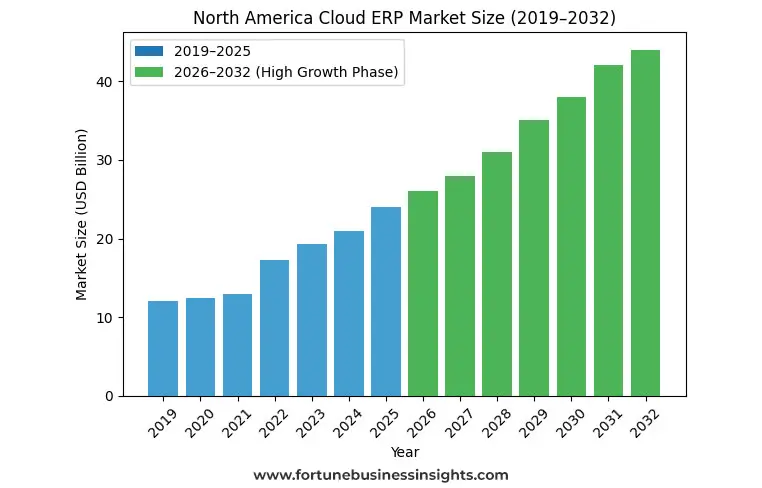
Why move your ERP from legacy to cloud?
ERP system migration helps organizations to stay atop the competition and ensure that they are using high-end technology that can boost their ROI and bottom line. We have listed the reasons why businesses should move their ERP from legacy to cloud.
1. Secured infrastructure
ERP cloud solutions are embedded with features such as data fortification and data sanitization, which are automated and backed by state-of-the-art security protocols. Cloud providers are strict about adhering to stringent data privacy laws and ensure multi-factor authentication to ensure end-to-end data protection.
Legacy ERP systems lack security of data; therefore, it is critical for organizations to invest in cloud ERP solutions to future-proof business.
2. No real-time insight into data
Legacy ERP solutions are hosted on on-premise platforms. Users cannot manage, view, and edit data in real time. This leads to delayed processes. On the other hand, modern cloud ERP systems support real-time working, data monitoring, and editing on advanced analytics tools.
3. Scalability
Legacy systems are rigid and have inflexible infrastructure. These are rigid and have reliance on local, in-house servers, which makes it difficult to perform as the data grows. ERP cloud migration ensures assures 99.99% uptime. Cloud ERP systems adapt to scalability without major hardware overhauls.
4. Cost reduction
Legacy ERP comes with additional costs of maintenance, specialized IT staff, security, and hardware. Cloud-based ERP software is delivered over the internet, which helps users to work remotely without investing in physical data centers and servers. IT fixes, maintenance, and upgrade costs are covered by the cloud provider at the minimal rates.
5. Quicker implementation
While on-premise software deployment takes time due to lengthy process of hardware installation, manual configurations, upgrades and testing, cloud ERP solutions are pre-configured and support modular rollouts.
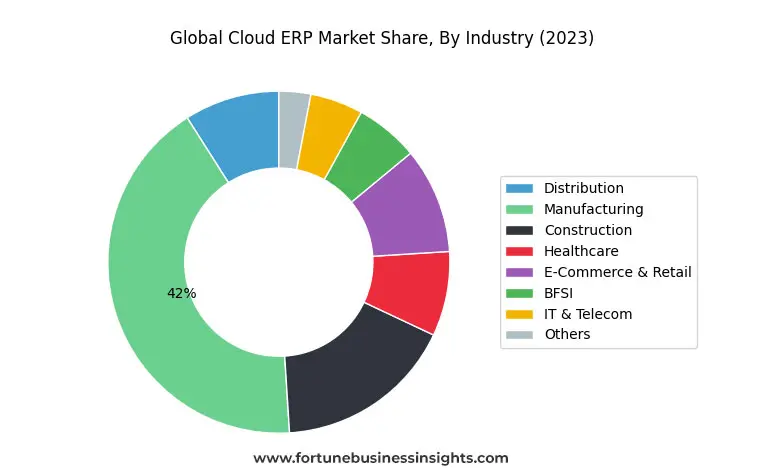
What are the challenges of ERP migration?
While moving from a legacy ERP to a cloud ERP solution brings many improvements in the organization, it also comes along with some challenges:
- Quality of data: All departments in the organization have their critical set of data. It is critical for organizations to check records before the ERP migration process. Without doing so, businesses may face issues such as data loss, duplicate data, obsolete product codes, and more.
- Resource constraints: Extracting, cleaning, and developing data for migration takes expertise and focus.
- Compliance and security: Data migration is a transition process that comes with cyber threats. So that ERP provider you choose should be aware of the regulatory guidelines of the business.
- Change management: Your employees might find it difficult to learn a new system. Balancing the workload may cause stress.
Difference between cloud and legacy ERP
| |
Cloud ERP |
Legacy ERP |
| Infrastructure setup |
Not required |
Required |
| Deployment model |
Ready-to-use |
Built from scratch |
| Customization |
Configurable |
Heavily customized |
| Updates |
Automatic |
Manual |
| Scalability |
Instant |
Limited |
Steps to Ensure a Smooth ERP Cloud Migration
Step 1: Choosing the right ERP software for your business
Before starting the ERP cloud migration journey, it is crucial to assess your business requirements and identify challenges in your legacy ERP system.
Step 2: Strategic planning and timeline development
This step includes defining objectives and goals, allocating budget and resources, establishing a realistic timeline to be on track, etc.
Step 3: Data management
As data is the foundation of every business, the ERP migration process ensures cleaning data for eliminating redundancies, data mapping (aligning current data fields with new data architecture), and data validation to confirm accuracy, followed by testing.
Step 4: Testing and validation
Make sure that the new ERP system is functioning correctly and data is transferred. It takes manual effort to check issues, correct them, and confirm that the new and old systems are in sync.
Step 5: Change management
It doesn’t matter what kind of ERP system you invest in; without a proper change management strategy, it can fail. It is important to deliver consistent information to the users about ERP benefits, new features, and impact on business. Crafting training programs and establishing feedback loops can help employees learn the new system with ease.
Step 6: Go-live and evaluation
This is the last step where the testing is done, users have completed their training, and they are ready to use this new ERP software for adding transactions and other business data.
Harness the power of Intelligent ERP with Beyond Key
We know that taking the first cloud migration step starts with having a reliable cloud consulting partner that can help you with end-to-end solutions. We take pride in creating custom tools and automations that can meet the customized needs of our clients. As a leading Microsoft Dynamics 365 ERP Consulting Partner, our team is well-versed with platforms such as Business Central, Dynamics 365, Power Platform and Azure. You can contact us for free consultation. Our experts are just a call away.
Frequently Asked Questions:
1. How long does ERP migration take?
The timeline of ERP cloud migration varies from business to business. It depends on the complexity and scope of the business, the quality of the data that needs to be migrated, and the complexity of the processes. On average, it takes 3 to 24 months for the ERP migration process.
2. What’s the difference between migrating to the cloud vs upgrading on-premises?
Cloud migration is the process that includes shifting IT operations to third-party servers, which can be accessed remotely. On the other hand, upgrading on-premise involves enhancing the infrastructure, which is hosted in-house.
3. Do all ERP systems support clouds?
No, not all ERP providers support the cloud.
4. Can legacy customizations move to the cloud?
With thorough planning, legacy customizations can move to the cloud, but this process might require designing a meticulous strategy. Also, it depends on the existing customizations that happened in the business and what the business goals are.
5. What ROI can businesses expect?
These are the key ROI drivers that businesses can expect from a cloud ERP provider:
- Reduced cost (lower IT spending, fewer maintenance expenses, and minimized overhead cost)
- Operational efficiency: reduced manual errors, faster delivery, and better collaboration with a unified platform that promotes real-time work.
- Innovation: automatic updates, real-time analytics for better and quicker decision-making.
- Increase in revenue: Stronger compliance and higher customer satisfaction ultimately lead to an increase in the revenue.