Microsoft 365 Security: Protecting Identities, Data & Collaboration
Let’s start with an uncomfortable truth: Microsoft 365 security breaches almost never happen because Microsoft’s data centers were compromised. They happen because of configuration gaps, missed settings, and human oversight.
The UK’s National Cyber Security Centre (NCSC) consistently points to compromised credentials and misconfigured cloud services as the primary causes of business email compromise and ransomware incidents. And most of the controls that prevent these attacks? They’re already included in your subscription. They’re just not turned on.
Whether you’re running Business Basic, Business Premium, or Enterprise plans, the difference between “we have Microsoft 365” and “we have secure Microsoft 365” comes down to how well you configure identity protection, threat defenses, and data controls.
Microsoft 365 Security: The Four Pillars
| Pillar |
What It Does |
Key Capabilities |
| 1. Identity & Access |
Controls who get in |
• MFA – Stops 99% of account attacks
• Conditional Access – Smart, risk-based rules
• PIM – Admin rights only when needed
• Identity Protection – Spots compromised accounts |
| 2. Threat Protection |
Stop attacks across surfaces |
• Defender for Office 365 Security– Scans email/links in real time
• Defender for Identity – Detects lateral movement
• Defender for Endpoint – Protects devices
• Azure Sentinel – Advanced threat hunting |
| 3. Information Protection |
Safeguards sensitive data |
• DLP – Blocks inappropriate sharing
• Sensitivity Labels – Classifies content
• Information Governance – Retain/delete compliantly
• Customer Lockbox – Controls MS support access |
| 4. Security & Risk |
Visibility and response |
• Secure Score – Grades your security posture
• Compliance Manager – Tracks regulations
• Insider Risk – Flags risky user behavior
• Advanced Audit – Extended log retention |
Microsoft 365 Security: A Phased Implementation Flow
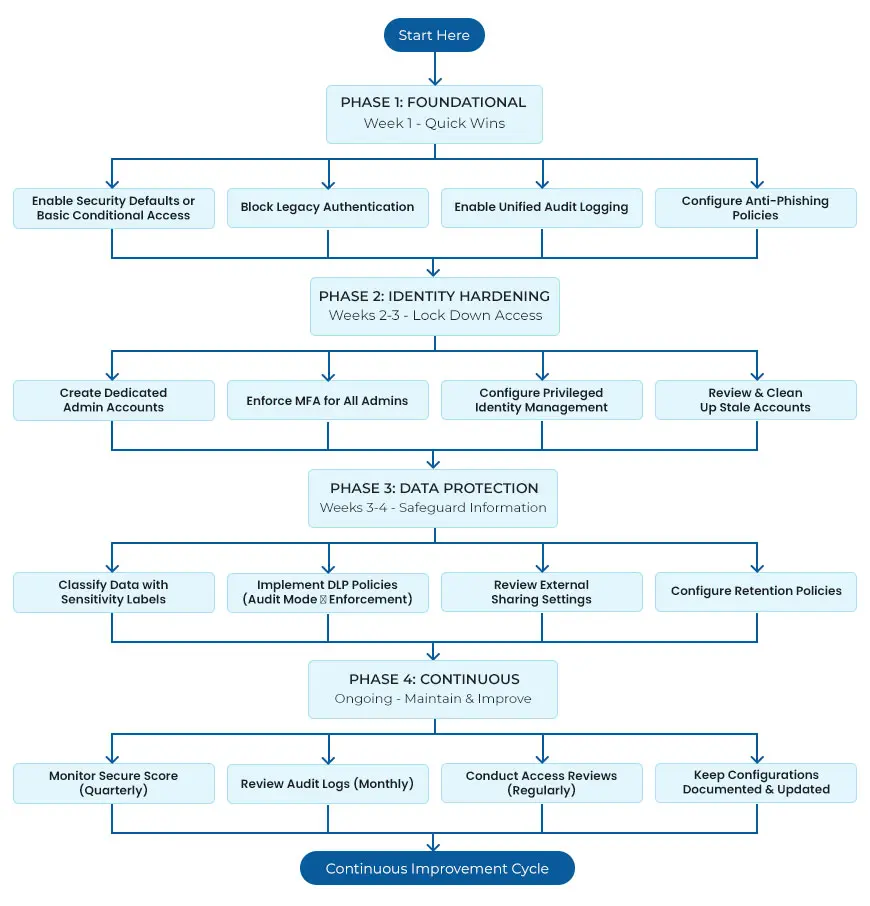 Essential Hardening Steps for Every Microsoft 365 Tenant
Theory is useful, but what matters is what you do next. Here are the practical steps that make a real difference.
Enable Multi-Factor Authentication for Everyone
If you do nothing else, do this. MFA blocks the vast majority of account takeover attacks.
- For Business Basic/Standard—Enable Security Defaults in Azure AD. It’s free and enforces MFA using the Authenticator app.
- For Business Premium/Enterprise—Use Conditional Access policies instead. This gives you more control over when MFA is required.
Pro tip: Enforce Authenticator app-based MFA, not SMS. SMS is vulnerable to SIM swapping; the Authenticator app with number matching is far more phishing resistant.
Protect Your Admin Accounts
Global admins have the keys to your entire kingdom. Treat them accordingly.
- Use dedicated admin accounts separate from daily work accounts.
- Require MFA for all admin roles, always.
- Enable Privileged Identity Management if available—this ensures admin rights are temporary, not permanent.
- Minimize the number of Global Admins. Most admin tasks don’t need full Global Admin rights.
Block Legacy Authentication
This sounds technical, but it’s straightforward. Legacy authentication protocols (like POP3, IMAP, and Basic Auth) don’t support MFA. That means attackers can bypass your strongest control simply by using an old protocol.
Use Conditional Access policies to block legacy authentication entirely. Before you do, check that your email clients support modern authentication—most modern versions do.
Configure Microsoft Defender for Office 365
- Exchange Online- Basic filtering is better than nothing, but Defender takes it to another level.
- Safe Attachments – Sandboxes email attachments before delivery to catch zero-day malware.
- Safe Links – Rewrites URLs in emails and Teams, checking them at click time against threat intelligence.
- Anti-phishing policies – Enable impersonation protection to detect emails spoofing your domain or executives.
- DKIM and DMARC – Configure these DNS records to prevent domain spoofing and get reports on unauthorized sending.
Set Up Data Loss Prevention
DLP policies scan emails and documents for sensitive patterns—credit cards, national insurance numbers, health data—and can block them from being shared inappropriately.
Start DLP in audit-only mode first- This lets you see what sensitive content is moving without accidentally blocking legitimate business. Once you understand the patterns, enable enforcement for the highest-risk scenarios.
Review External Sharing Settings
By default, Microsoft 365 lets users share files with anyone using any email address. This is convenient, but it’s also a common source of unintentional data exposure.
In the SharePoint Admin Centre, consider:
- Restricting sharing to authenticated external users only
- Enabling link expiry for anonymous sharing links
- Limiting sharing to specific approved external domains where appropriate
Enable Unified Audit Logging
The Unified Audit Log captures user and admin activity across Exchange, SharePoint, Teams, and Azure AD. This is essential for investigating incidents and meeting compliance requirements. Check that audit logging is enabled (it usually is by default) and understand your retention period—90 days on Business plans, longer with E5 or Advanced Audit.
Use Secure Score as Your Guide
Microsoft Secure Score (accessible at security.microsoft.com) gives you a scored view of your security posture with prioritized recommendations. It’s the easiest way to identify what to tackle next.
Don’t aim for 100%—some recommendations may not fit your environment. But use it to track progress and close the most impactful gaps.
The Shared Responsibility Model: What Microsoft Handles vs. What You Own
Here’s a distinction that surprises many organizations. Microsoft is responsible for the security of clouds, the physical data centers, the underlying infrastructure and the platform itself. You are responsible for security in the cloud—your data, your configurations, your user access, and your compliance obligations.
That 99.9% uptime guarantee? It covers application availability, not data loss from human error, malicious insiders, or ransomware. Microsoft can’t prevent an admin from accidentally deleting a SharePoint site, and they won’t restore it for you unless you have backup.
This is why relying solely on Microsoft’s built-in protections leaves gaps. A comprehensive Microsoft Office 365 Security strategy includes third-party backup, careful configuration, and ongoing monitoring.
Common Mistakes We Keep Seeing
Even well-intentioned organizations make these errors. Learn from them:
- MFA not enforced – The single biggest gap. Attackers love this.
- Legacy authentication left enabled – Bypasses all your modern controls.
- Admin accounts used for daily work – Increases exposure of privileged credentials.
- No DLP policies – Sensitive data flows out unnoticed.
- External sharing unrestricted – Data leaks waiting to happen.
- Audit logging not checked – No visibility when incidents occur.
- Configuration drift – Settings change over time and security posture degrades.
Is Your Microsoft 365 Tenant Properly Secured?
Most organizations have significant gaps they don’t know about. A proper office 365 security management typically uncovers multiple quick wins that dramatically reduce risk.
Questions to ask yourself:
- Are we sure MFA is enabled for every user, including admins?
- Do we know what legacy authentication is still running?
- Could we detect a compromised account today?
- Are we accidentally oversharing sensitive data externally?
- If a site was deleted, could we restore it?
If any of these questions make you uncomfortable, it’s worth taking a closer look. Microsoft 365 security isn’t a set-it-and-forget-it exercise—it’s ongoing attention to configuration, monitoring, and improvement.
Need Help Assessing Your Tenant? Let’s talk.